微软邮箱自动化
首先微软邮箱由于Oauth2的影响不允许直接使用imap, smtp等服务,需要先通过Oauth认证才能正常使用。
一般情况下的流程是这样的:
- 注册outlook邮箱
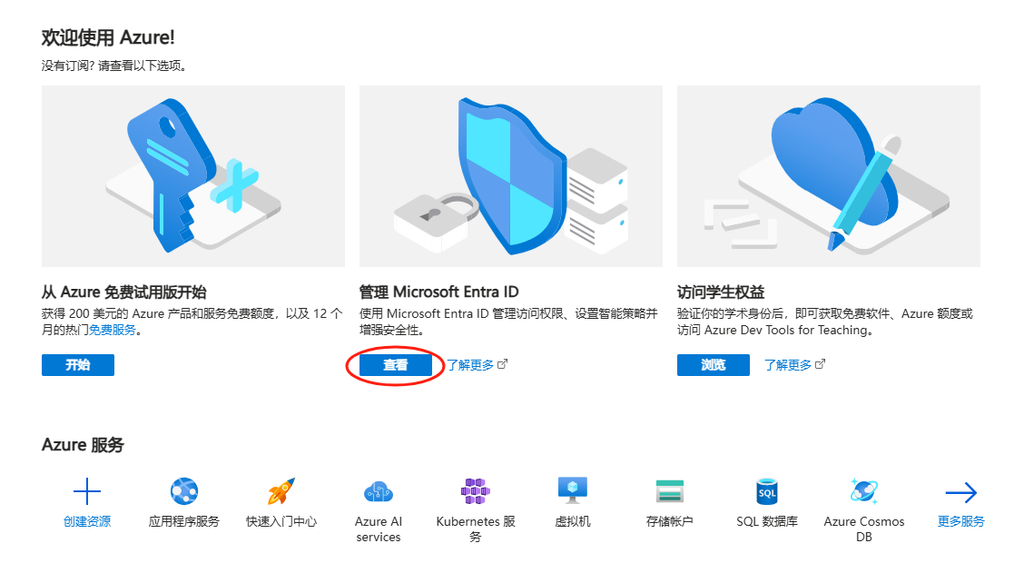
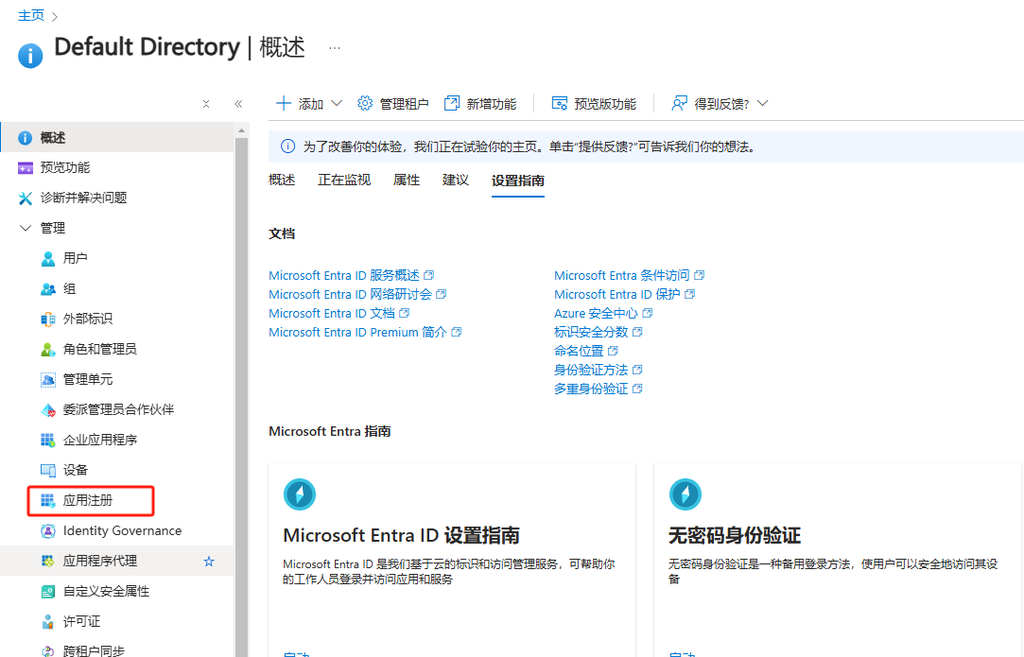
- 打开这个网址https://portal.azure.com/#view/Microsoft_AAD_IAM/ActiveDirectoryMenuBlade/~/Overview
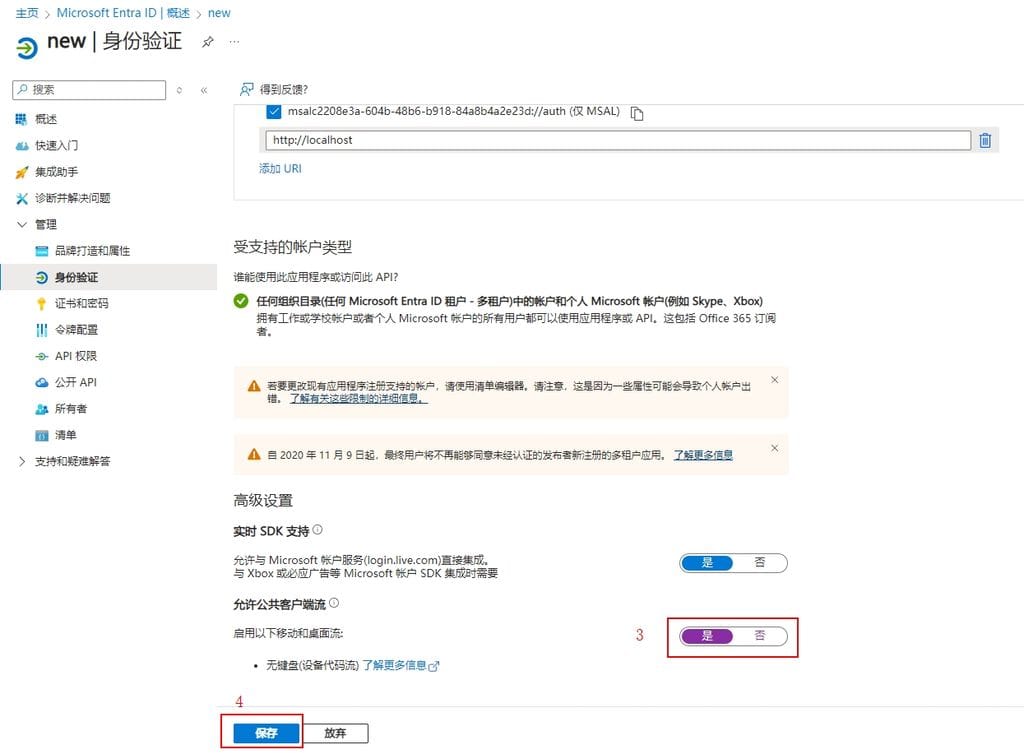
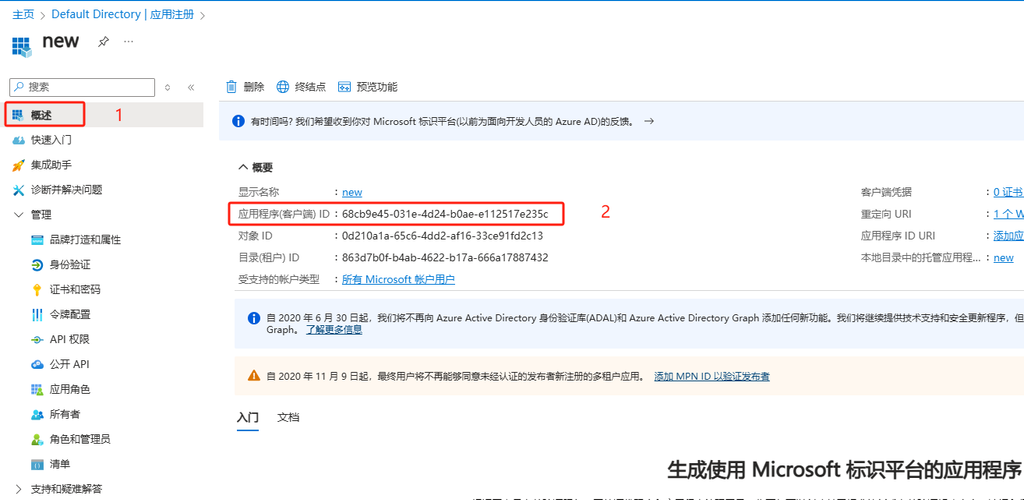
- 然后注册应用,选择web或者客户端都可以,回调地址写本地,不需要https
- 然后可以得到一个client_id, 这个id就是用来获取access_token和refresh_token的,这一块需要写代码或者手动构造链接访问。
- access_token一个小时过期,refresh_token是90天,所以我们需要保存refresh_token, 可以通过refresh_token来获取access_token
config.txt
[microsoft]
client_id = 'your_client_id'
client_secret = 'your_client_secret'
redirect_uri = http://localhost:8000

[tokens]
get_refresh_token.py
#!/usr/bin/env python3
"""
Microsoft OAuth2认证脚本
用于获取Microsoft的access_token和refresh_token
"""

from DrissionPage import Chromium
import requests
from typing import Dict
import logging
import configparser
from urllib.parse import quote, parse_qs
import time
from datetime import datetime
import winreg
import base64
import hashlib
import secrets
import string

def get_proxy():
    try:
        with winreg.OpenKey(winreg.HKEY_CURRENT_USER, r"Software\Microsoft\Windows\CurrentVersion\Internet Settings") as key:
            proxy_enable, _ = winreg.QueryValueEx(key, "ProxyEnable")
            proxy_server, _ = winreg.QueryValueEx(key, "ProxyServer")

            if proxy_enable and proxy_server:
                proxy_parts = proxy_server.split(":")
                if len(proxy_parts) == 2:
                    return {"http": f"http://{proxy_server}", "https": f"http://{proxy_server}"}
    except WindowsError:
        pass
    return {"http": None, "https": None}

def load_config():
    config = configparser.ConfigParser()
    config.read('config.txt', encoding='utf-8')
    return config

def save_config(config):
    with open('config.txt', 'w', encoding='utf-8') as f:
        config.write(f)

# 配置日志
logging.basicConfig(level=logging.INFO)
logger = logging.getLogger(__name__)

# 加载配置
config = load_config()
microsoft_config = config['microsoft']

CLIENT_ID = microsoft_config['client_id']
REDIRECT_URI = microsoft_config['redirect_uri']

# API端点
AUTH_URL = 'https://login.microsoftonline.com/common/oauth2/v2.0/authorize'
TOKEN_URL = 'https://login.microsoftonline.com/common/oauth2/v2.0/token'

# 权限范围
SCOPES = [
    'offline_access',
    'https://graph.microsoft.com/Mail.ReadWrite',
    'https://graph.microsoft.com/Mail.Send',
    'https://graph.microsoft.com/User.Read'
]

def generate_code_verifier(length=128) -> str:
    """生成PKCE验证码"""
    alphabet = string.ascii_letters + string.digits + '-._~'
    return ''.join(secrets.choice(alphabet) for _ in range(length))

def generate_code_challenge(code_verifier: str) -> str:
    """生成PKCE挑战码"""
    sha256_hash = hashlib.sha256(code_verifier.encode()).digest()
    return base64.urlsafe_b64encode(sha256_hash).decode().rstrip('=')

def request_authorization(tab) -> tuple:
    """请求Microsoft OAuth2授权"""
    code_verifier = generate_code_verifier()
    code_challenge = generate_code_challenge(code_verifier)

    scope = ' '.join(SCOPES)
    auth_params = {
        'client_id': CLIENT_ID,
        'response_type': 'code',
        'redirect_uri': REDIRECT_URI,
        'scope': scope,
        'response_mode': 'query',
        'prompt': 'select_account',
        'code_challenge': code_challenge,
        'code_challenge_method': 'S256'
    }

    params = '&'.join([f'{k}={quote(v)}' for k, v in auth_params.items()])
    auth_url = f'{AUTH_URL}?{params}'

    tab.get(auth_url)
    logger.info("等待用户登录和授权...")

    tab.wait.url_change(text='localhost:8000', timeout=300)

    callback_url = tab.url
    logger.info(f"回调URL: {callback_url}")

    query_components = parse_qs(callback_url.split('?')[1]) if '?' in callback_url else {}

    if 'code' not in query_components:
        raise ValueError("未能获取授权码")

    auth_code = query_components['code'][0]
    logger.info("成功获取授权码")
    return auth_code, code_verifier

def get_tokens(auth_code: str, code_verifier: str) -> Dict[str, str]:
    """使用授权码获取访问令牌和刷新令牌"""
    token_params = {
        'client_id': CLIENT_ID,
        'code': auth_code,
        'redirect_uri': REDIRECT_URI,
        'grant_type': 'authorization_code',
        'scope': ' '.join(SCOPES),
        'code_verifier': code_verifier
    }

    headers = {
        'Content-Type': 'application/x-www-form-urlencoded'
    }

    try:
        response = requests.post(TOKEN_URL, data=token_params, headers=headers, proxies=get_proxy())
        response.raise_for_status()
        return response.json()
    except requests.RequestException as e:
        logger.error(f"获取令牌失败: {e}")
        if hasattr(e, 'response') and e.response is not None:
            logger.error(f"响应内容: {e.response.text}")
        raise

def main():
    try:
        browser = Chromium()
        tab = browser.new_tab()

        logger.info("正在打开浏览器进行授权...")

        try:
            auth_code, code_verifier = request_authorization(tab)
            tab.close()
            logger.info("成功获取授权码!")

            tokens = get_tokens(auth_code, code_verifier)

            if 'refresh_token' in tokens:
                logger.info("成功获取refresh_token!")
                config['tokens']['refresh_token'] = tokens['refresh_token']
                if 'access_token' in tokens:
                    config['tokens']['access_token'] = tokens['access_token']
                    expires_at = time.time() + tokens['expires_in']
                    expires_at_str = datetime.fromtimestamp(expires_at).strftime('%Y-%m-%d %H:%M:%S')
                    config['tokens']['expires_at'] = expires_at_str
                save_config(config)
        finally:
            browser.quit()

    except Exception as e:
        logger.error(f"程序执行出错: {e}")
        raise

if __name__ == '__main__':
    main()
mail_api.py
#!/usr/bin/env python3
"""
Microsoft邮件处理脚本
用于收发Microsoft账号的邮件
"""

import requests
import logging
from datetime import datetime
from typing import Dict, List
import configparser
import winreg
import time

def get_proxy():
    try:
        with winreg.OpenKey(winreg.HKEY_CURRENT_USER, r"Software\Microsoft\Windows\CurrentVersion\Internet Settings") as key:
            proxy_enable, _ = winreg.QueryValueEx(key, "ProxyEnable")
            proxy_server, _ = winreg.QueryValueEx(key, "ProxyServer")

            if proxy_enable and proxy_server:
                proxy_parts = proxy_server.split(":")
                if len(proxy_parts) == 2:
                    return {"http": f"http://{proxy_server}", "https": f"http://{proxy_server}"}
    except WindowsError:
        pass
    return {"http": None, "https": None}

def load_config():
    """从config.txt加载配置"""
    config = configparser.ConfigParser()
    config.read('config.txt', encoding='utf-8')
    return config

def save_config(config):
    """保存配置到config.txt"""
    with open('config.txt', 'w', encoding='utf-8') as f:
        config.write(f)

logging.basicConfig(level=logging.INFO)
logger = logging.getLogger(__name__)

config = load_config()
microsoft_config = config['microsoft']

CLIENT_ID = microsoft_config['client_id']
GRAPH_API_ENDPOINT = 'https://graph.microsoft.com/v1.0'
TOKEN_URL = 'https://login.microsoftonline.com/common/oauth2/v2.0/token'

class EmailClient:
    def __init__(self):
        config = load_config()
        if not config.has_section('tokens'):
            config.add_section('tokens')
        self.config = config
        self.refresh_token = config['tokens'].get('refresh_token', '')
        self.access_token = config['tokens'].get('access_token', '')
        expires_at_str = config['tokens'].get('expires_at', '1970-01-01 00:00:00')
        self.expires_at = datetime.strptime(expires_at_str, '%Y-%m-%d %H:%M:%S').timestamp()

    def is_token_expired(self) -> bool:
        """检查access token是否过期或即将过期"""
        buffer_time = 300
        return datetime.now().timestamp() + buffer_time >= self.expires_at

    def refresh_access_token(self) -> None:
        """刷新访问令牌"""
        refresh_params = {
            'client_id': CLIENT_ID,
            'refresh_token': self.refresh_token,
            'grant_type': 'refresh_token',
        }

        try:
            response = requests.post(TOKEN_URL, data=refresh_params, proxies=get_proxy())
            response.raise_for_status()
            tokens = response.json()

            self.access_token = tokens['access_token']
            self.expires_at = time.time() + tokens['expires_in']
            expires_at_str = datetime.fromtimestamp(self.expires_at).strftime('%Y-%m-%d %H:%M:%S')

            self.config['tokens']['access_token'] = self.access_token
            self.config['tokens']['expires_at'] = expires_at_str

            if 'refresh_token' in tokens:
                self.refresh_token = tokens['refresh_token']
                self.config['tokens']['refresh_token'] = self.refresh_token
            save_config(self.config)
        except requests.RequestException as e:
            logger.error(f"刷新访问令牌失败: {e}")
            raise

    def ensure_token_valid(self):
        """确保token有效"""
        if not self.access_token or self.is_token_expired():
            self.refresh_access_token()

    def get_messages(self, folder_id: str = 'inbox', top: int = 10) -> List[Dict]:
        """获取指定文件夹的邮件

        Args:
            folder_id: 文件夹ID, 默认为'inbox'
            top: 获取的邮件数量
        """
        self.ensure_token_valid()

        headers = {
            'Authorization': f'Bearer {self.access_token}',
            'Accept': 'application/json',
            'Prefer': 'outlook.body-content-type="text"'
        }

        query_params = {
            '$top': top,
            '$select': 'subject,receivedDateTime,from,body',
            '$orderby': 'receivedDateTime DESC'
        }

        try:
            response = requests.get(
                f'{GRAPH_API_ENDPOINT}/me/mailFolders/{folder_id}/messages',
                headers=headers,
                params=query_params,
                proxies=get_proxy()
            )
            response.raise_for_status()
            return response.json()['value']
        except requests.RequestException as e:
            logger.error(f"获取邮件失败: {e}")
            if response.status_code == 401:
                self.refresh_access_token()
                return self.get_messages(folder_id, top)
            raise

    def get_junk_messages(self, top: int = 10) -> List[Dict]:
        """获取垃圾邮件文件夹中的邮件"""
        return self.get_messages(folder_id='junkemail', top=top)

    def send_email(self, to_recipients: List[str], subject: str, content: str, is_html: bool = False) -> bool:
        """发送邮件

        Args:
            to_recipients: 收件人邮箱地址列表
            subject: 邮件主题
            content: 邮件内容
            is_html: 内容是否为HTML格式,默认为False

        Returns:
            bool: 发送是否成功
        """
        self.ensure_token_valid()

        headers = {
            'Authorization': f'Bearer {self.access_token}',
            'Content-Type': 'application/json'
        }

        email_msg = {
            'message': {
                'subject': subject,
                'body': {
                    'contentType': 'HTML' if is_html else 'Text',
                    'content': content
                },
                'toRecipients': [
                    {
                        'emailAddress': {
                            'address': recipient
                        }
                    } for recipient in to_recipients
                ]
            }
        }

        try:
            response = requests.post(
                f'{GRAPH_API_ENDPOINT}/me/sendMail',
                headers=headers,
                json=email_msg,
                proxies=get_proxy()
            )
            response.raise_for_status()
            logger.info(f"邮件已成功发送给 {', '.join(to_recipients)}")
            return True
        except requests.RequestException as e:
            logger.error(f"发送邮件失败: {e}")
            if response.status_code == 401:
                self.refresh_access_token()
                return self.send_email(to_recipients, subject, content, is_html)
            raise

def main():
    try:
        client = EmailClient()

        recipients = ['recipient@example.com']  # 替换为实际的收件人邮箱
        print("\n发送邮件:")
        subject = '测试邮件'                     #替换为实际发送邮件的主题
        content = '这是一封测试邮件。\n\n来自Python脚本的问候!'   #替换为实际发送邮件的内容

        if client.send_email(recipients, subject, content):
            print("邮件发送成功!")

        # 获取收件箱邮件,top=n表示获取最新n封邮件
        messages = client.get_messages(top=1)
        print("\n收件箱最新邮件:")
        for msg in messages:
            print("\n" + "="*50)
            print(f"主题: {msg['subject']}")
            print(f"发件人: {msg['from']['emailAddress']['address']}")
            print(f"时间: {msg['receivedDateTime']}")
            print(f"\n邮件内容:{msg['body']['content']}")

        # 获取垃圾邮件,top=n表示获取最新n封邮件
        junk_messages = client.get_junk_messages(top=1)
        print("\n垃圾邮件文件夹最新邮件:")
        for msg in junk_messages:
            print("\n" + "="*50)
            print(f"主题: {msg['subject']}")
            print(f"发件人: {msg['from']['emailAddress']['address']}")
            print(f"时间: {msg['receivedDateTime']}")
            print(f"\n邮件内容:{msg['body']['content']}")

    except Exception as e:
        logger.error(f"程序执行出错: {e}")
        raise

if __name__ == '__main__':
    main()
将上面三个文件放在一起,运行get_refresh_token.py ,脚本运行过程中会调用浏览器,需要手动登录微软账号,首次运行会弹出下图 授权 确认,点击“接受”即可。
![[Pasted image 20250321151829.png]]
![[Pasted image 20250321151847.png]]
然后发送邮件运行mail_api.py即可
上面的代码在这里也有一份:https://github.com/hmhm2022/outlook-mail-automation
目前的内容还是对于我引用里面第一个链接的内容的一个备份。
Part2:我们拥有了账号,密码,client_id, refresh_token
如果我们拥有了1000个这样的数据,现在要遍历这1000个邮箱里面的数据,应该怎么做?
我们需要一个代理软件,帮我们去请求access_token,当然你是用上面的mail_api里面的逻辑也可以,不过微软的Oauth有频率限制,注意不要并发太高,如果要高并发就多给几个IP
Oauth代理代码可以使用这个:
https://github.com/HChaoHui/msOauth2api
git clone https://github.com/HChaoHui/msOauth2api
cd msOauth2api
npm install
npm install -g vercel
vercel dev
这样就可以在本地启动这个项目,一般启动在localhost:3000,当然也可以直接点击readme里面的Deploy也会给,不过我发现部署在vercel上面的服务比较容易挂掉,几乎是一片红,本地要稳定一些。这是我在vercel部署好的地址:https://msoauth2apiforlt.vercel.app/ ,如果可以打开的话可以试试。
请求示例如下,我给的是真实的邮箱,你们可以自己试试:
import requests
url = "http://localhost:3000/api/mail-new"
data = {
    "refresh_token": "M.C525_BAY.0.U.-Cmh*G5FllkO*ObOO4ZTgWySRURoICeDwioJVlHIKF802sYe7PntI8k6IAFRiGgkoRqRP287sN2v!TuVxke8P6sHx!1msZs8eFyXrW6a2LkuUDj5jmm2*x0iB2ExPdSJAtxg8a7*ZFuxMMetFPoRZuHvVRFus2FyFILFtWhgHy5bqQ8MQ0PyVEdsCs14Ge7ZL4b776iY3YYb3Ttkauv3Y8*xfoIWOaXzzpv3Y8PkHaxlWZWidn!ygfxg1!6Rd0fjJZseph9RTR!unI1IJ9iJ4TpJm!KOsUXpJRYIyjumC44VsJZWdn2*nqrqkkX7NRlFQo0Zcd5gPP3H!iY*qd42478bs4vOprhzNmKMqz5HRm7EqKdqZMRTutc*p2nWoMIGNGg$$",
    "client_id": "9e5f94bc-e8a4-4e73-b8be-63364c29d753",
    "email": "araiawolma0w@outlook.com",
    "mailbox": "INBOX",  # Example: INBOX, Junk, etc.
    "password": "MTyTVHE1X4YX"  # Assuming the password is checked on the server-side
}
response = requests.post(url, json=data)
print("Status Code:", response.status_code)
print("Response Text:", response.text)
TIP
我在C Cursor试用的时候,发现直接让cursor给我发邮件老是获取不到验证码,于是我先用脚本给我一个不用的邮箱发送一个邮件,然后清空这个outlook里面所有的邮件,再把地址给Cursor, 这样就可以收到验证码了。
REF
https://blog.linuxdo.nyc.mn/article/17938566-1c0c-80c6-96a4-d6b7b84b4461
https://github.com/hmhm2022/outlook-mail-automation
https://github.com/HChaoHui/msOauth2api